Olist Store Analysis | Power BI Project

Preview
The OLIST STORE is an e-commerce business headquartered in Sao Paulo, Brazil. This firm acts as a single point of contact between various small businesses and the customers who wish to buy their products. In this project We are given multiple tables in CSV format and a schema depicting how these tables are connected. After connecting all the 8 tables, we analyze the entire dataset. It contains multiple categorical and numerical columns and information about 100k orders made at multiple marketplaces between 2016 to 2018.
In this project we are provided with 5 KPI’s on which we have to work & provide answers & solutions by analyzing the dataset. During this project we worked in different phases & tools. Steps involved in this process were data cleaning using power query, data modeling for fact & dimensions table based on the basis of primary & foreign key relationship present in the reference image provided. By using MYSQL Workbench we found the answers for particular KPI by joining the tables using joins concept. Finally to present the in depth analysis for each KPI in the form of an interactive dashboard we used Power BI.

Dataset:
Olist Store Analysis | Power BI Project
Problem Statements(KPI):
  1. Weekday Vs Weekend Payment Statistics
  2. Number of Orders with review score 5 and payment type as credit card
  3. Average number of days taken for Pet Shop
  4. Average price and payment values from customers of Sao Paulo city
  5. Relationship between shipping days Vs review scores
After importing the files in Pier BI I did the analysis on the above given KPI and tried to represent analysis & answers in the form of a dashboard using Power BI.
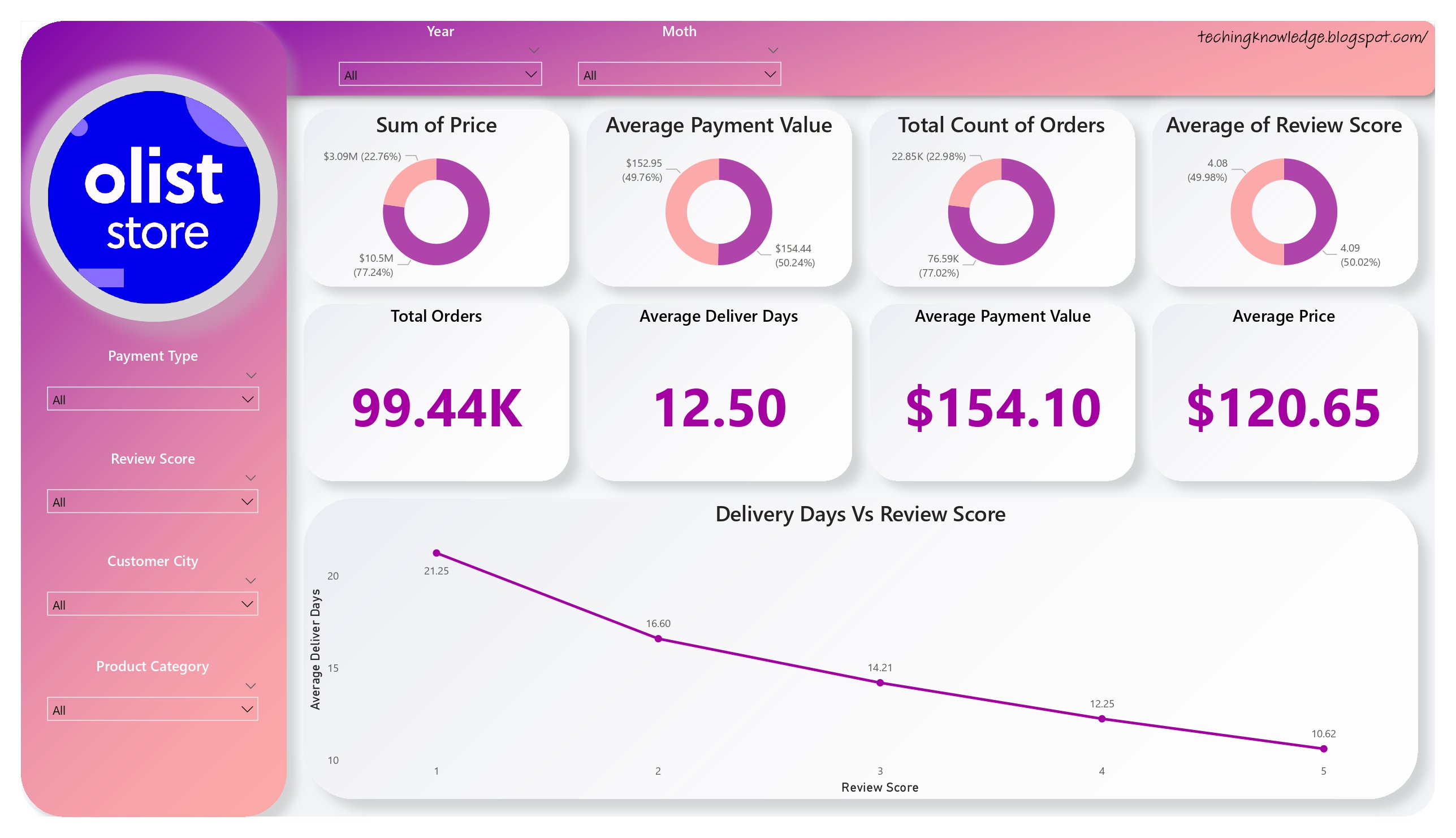
Main dashboard which represents the analysis for the 5 KPI
Olist Store Analysis | Power BI Project

1. Weekday Vs Weekend Payment Statistics
Olist Store Analysis | Power BI Project
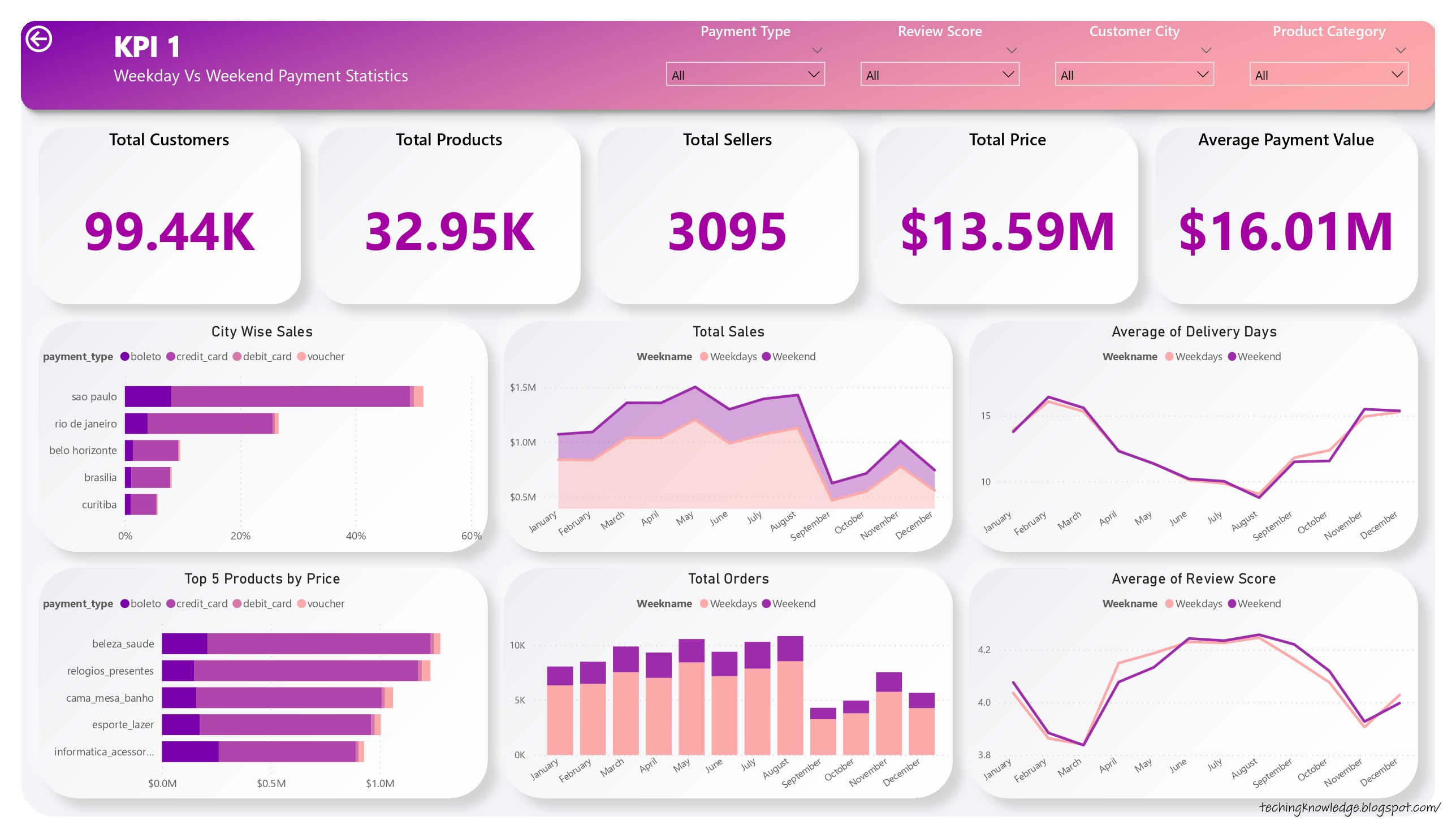
  • Total orders, Total Sales, Payment Value is more on weekdays as compared to weekends.
  • Maximum sales($1.91M), count of orders(17.80K) & customers(15.54K) are from Sao Paulo city during weekdays & weekends.
  • Credit cards are the payment type used by most of the customers(75.24%) with a total payment value of $12.54M.
  • Maximum orders are placed during March to August(60.38K) so sales for this month($8.34M) are higher. There is a positive correlation between count of orders & sales.

2. Number of Orders with review score 5 and payment type as credit card
Olist Store Analysis | Power BI Project
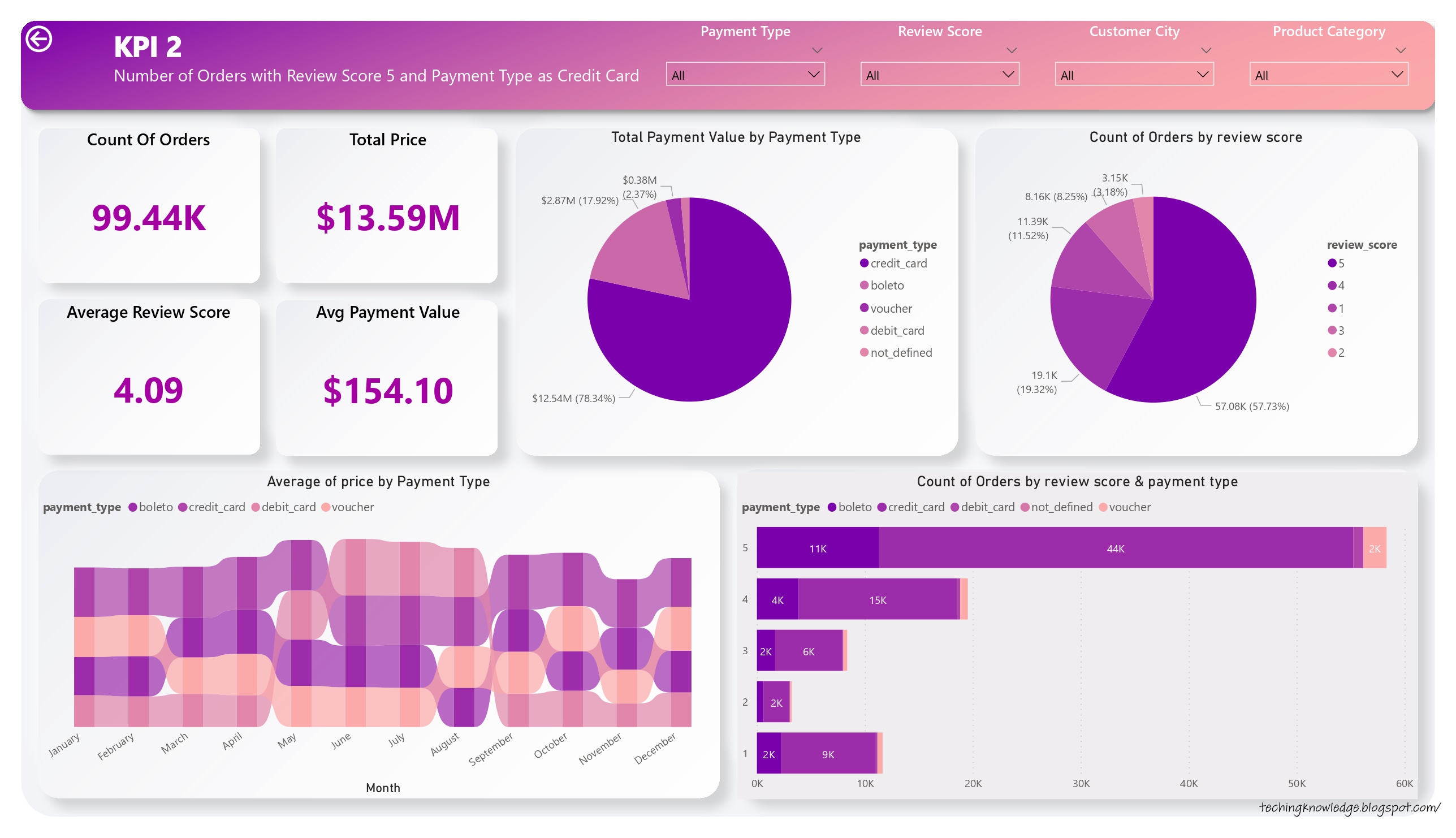
  • Maximum payment value is done through payment value credit card(78.34%) with payment value $12.54M followed by boleto(17.92%) with payment value $2.87M.
  • More than 77% of the orders received review score more than 4 because of which overall review score is 4.09.
  • If the payment value of the product is higher then customers preferred installment option which is available on credit card only this is one of the main reasons customers preferred credit card as payment type.
  • Bed bath table, health beauty, sports leisure, furniture decor, computer accessories, housewares & watches gifts are the products which were most recommended by customers with average reviews score more than 4.

3. Average number of days taken for Pet Shop
Olist Store Analysis | Power BI Project
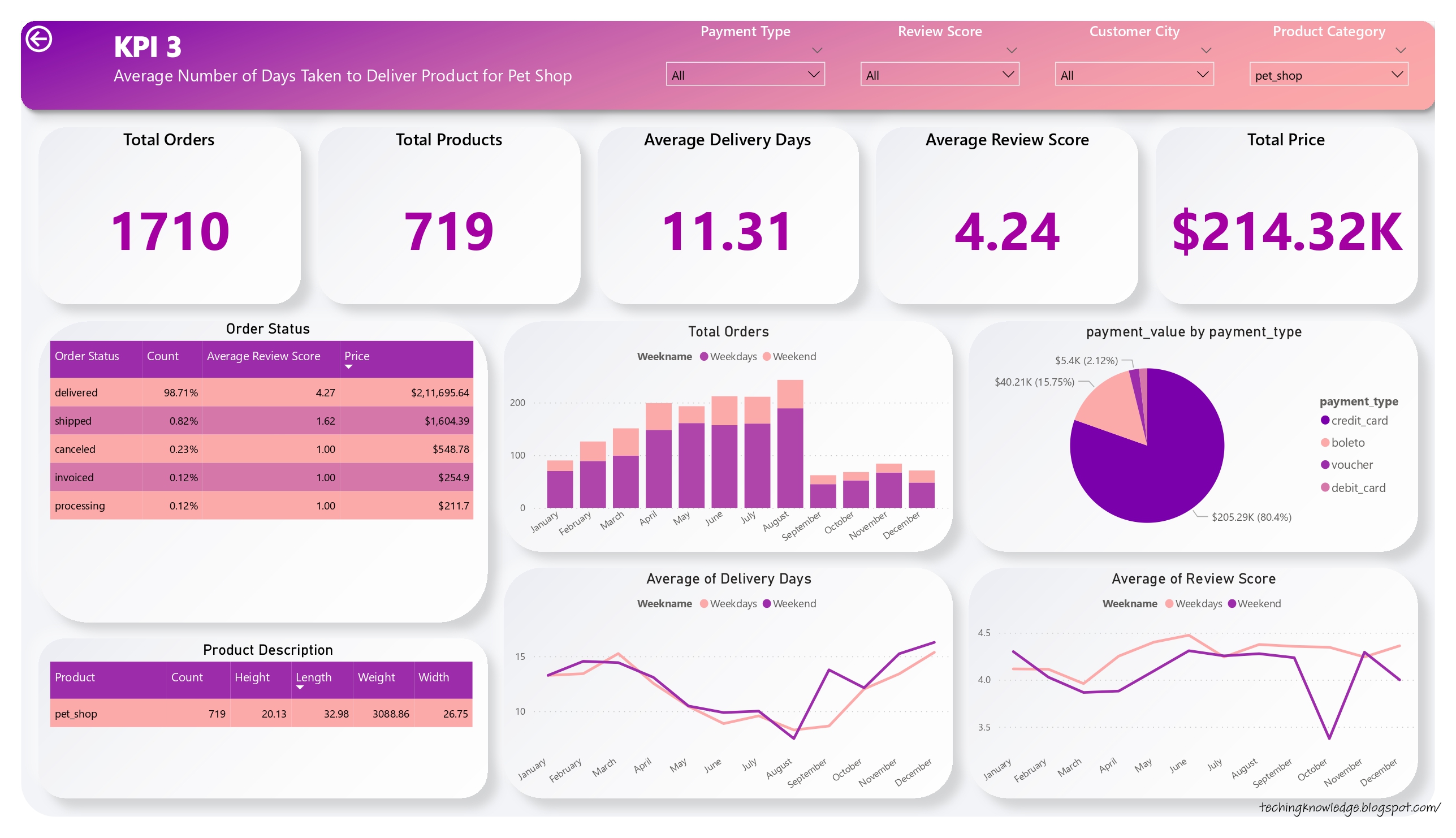
  • Orders for the Pet Shop category are delivered between 7 to 15 days which brings the average delivery days to approximately 11 days for pet shops.
  • Out of 1710 ordered products 1688 products(98.71) are delivered successfully with average delivery days as 11.31 resulting 4.24 as positive review score for pet shop product category.
  • Maximum orders for the pet shop category products are placed during April to August months(1058) with total price $131.10K, average delivery day 9.90 & review score 4.31.
  • In the month of august delivery days went from 11 to 8 days, in turn rating went up to 4.38 which is above average(4.24).

3. Average price and payment values from customers of Sao Paulo city
Olist Store Analysis | Power BI Project
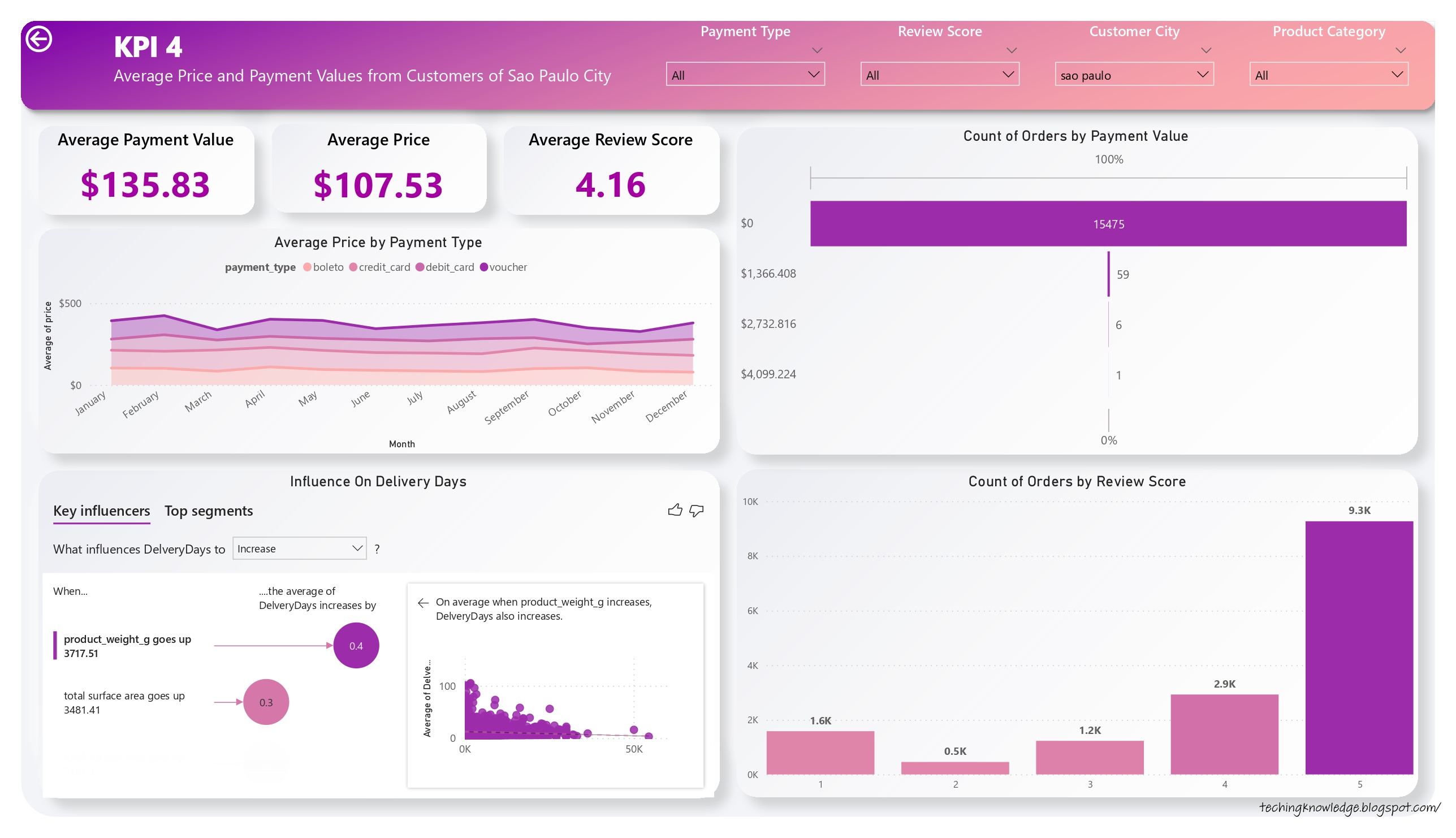
  • The maximum crowd is from Sao Paulo city resulting in 15.62% of total orders being placed from Sao Paulo which contributes to 15.39% of overall sales.
  • Around 97.63% of the total order had a price in between $0 to $700, Which brings the overall average price approx. $120.
  • Average Review Score is 4.16 because more than 77% of total orders received review score 4 and above.
  • Credit card is the most proffered payment type in Sao Paulo with $135.83 average payment value & $1.91M total sales which is 81.51% as compared to other payment types.
  • Contribution of Sao Paulo is more as compared to other cities in overall sales($1.91M) and payment value($2.20M).

5. Relationship between shipping days Vs review scores
Olist Store Analysis | Power BI Project
  • Over 76% of orders got more than 3.5 star rating, which is closer to overall average rating of 4.09.
  • Delivery days are directly influencing review scores. When delivery days are more than 30, the average review score is 1.87, which is 2.21 units lower than the overall average of 4.09.
  • Review score can be increased by working on delivery days. My stats review score is 0.70 points higher when delivery days are less than 11.
  • Weight & surface area of product are also influencing delivery days. More than 71% of orders has 12 delivery days, as they weigh from 0gm to 2000 gm & have surface area from 250sq.cm to 3500sq.cm
  • As delivery days increase, delivery costs also increase with the exception of a few products.

Conclusion
  • Maximum orders are placed between March to August(60.38K) because of which sales during this month are higher($8.34M) which is 61.36% of total sales. Which shows that the store is performing well during this month.
  • Currently credit cards are the most preferred payment type by customers which contributes a major role in overall sales(78.44%). To improve sales & to promote other payment types, Olist Store can provide discounts & offers on other payment types.
  • Olist Store needs to work more during the last quarter to improve the sales as there are less orders placed during September to December months which also results in less average review score. Store needs to focus on advertisement & different offers on products during the period.
  • Maximum customer crowd is from Sao Paulo & Eastern side of the country as compared to other regions. To improve the sales in other regions stores need to focus on campaign & promotion in these regions.
  • After observing the comment section we got to know that Bed bath table, health beauty, sports leisure, furniture decor, computer accessories, housewares & watches gifts are the products which receive maximum of the recommendation from customers with average review score 4.08 which shows these are most demanding products among the customers.
  • From 5th KPI we can conclude that if sellers take longer days to deliver the product then customers provide less review score which shows it is one the factor that influences review score.
  • Sellers should improve on delivery days & should keep customers informed about status of delivery it will make time go much faster for customer and will create personalize experience because they know what's happening.


Technology Topper Tuesday, November 29, 2022
Read more ...
Maven Pizza Challenge - Maven Analytics | Power BI Project

For the Maven Pizza Challenge, playing the role of a BI Analyst by Plato's Pizza, a Greek-inspired pizza place in New Jersey. Designed a dashboard to analyze & help the restaurant use data to improve operations. Found some useful insight & answer for the question provided in the challenge by creating the interactive dashboard in Power BI.
The data was provided by Maven as a part of the challenge. It was contained in 4 .csv files, named Orders, Order Details, Pizzas, and Pizza type. The dataset was already clean so there was no need to do anything else in this step of the process.


About the dataset:
  • This dataset contains 4 tables in CSV format
  • The Orders table contains the date & time that all table orders were placed
  • The Order Details table contains the different pizzas served with each order in the Orders table, and their quantities
  • The Pizzas table contains the size and price for each distinct pizza in the Order Details table, as well as its broader pizza type
  • The Pizza Types table contains details on the pizza types in the Pizzas table, including their name as it appears on the menu, the category it falls under, and its list of ingredients

For the analysis I have imported tables in power BI. I have done the data modeling in Power BI by connecting the 4 tables based of primary & foreign key. After connecting the table I did the analysis for the given problem statements by maven analytics. Below is the Power BI dashboard which I have created to show the analysis for the Maven Pizza challenge.

DASHBOARD
  • Plato's Pizzas is open from 9:00 a.m. to 11:00 p.m. every day of the week.They have 4 pizza categories and 32 pizza types in 5 different sizes.
  • A total of 21.35K pizza orders were placed, and a total of 48.75K pizzas were sold, with an average of 2.32 pizzas per order.
  • The busiest day is Friday because the majority of orders are placed on this day, and the busiest time for the store is between 12 and 1 p.m.
  • Classic-type pizza is the category that is ordered by most of the customers (29.9%), followed by supreme, veggie, and chicken. Large-size pizza is preferred by most of the customers, followed by medium, small, XL, and XXL.
  • The bestselling pizza was the "Classic Deluxe Pizza" (2453 orders), and the lowest selling pizza was the "Brie Carre Pizza" (490 orders).


Technology Topper Tuesday, November 29, 2022
Read more ...
Superstore Sales Analysis Project | Tableau Project

Tableau Superstore Dataset is a sample Dataset provided by Tableau which includes data for the Sales of multiple products sold by a company along with subsequent information related to geography, Product categories, and subcategories, sales, and profits, segmentation amongst the consumers, etc.

Dataset Description:

Column

Data Type

Column

Data Type

Order ID

String

Postal Code

Geographic

Order Date

Date

Region

String

Ship Date

Date

Product ID

String

Ship Mode

String

Category

String

Customer ID

String

Sub-Category

String

Customer Name

String

Product Name

String

Segment

String

Sales

Number

Country

Geographic

Quantity

Number

City

Geographic

Discount

Number

State

Geographic

Profit

Number


Superstore dataset contains the hierarchical data column Order date & ship date in the form of Year-Month-Week. Also for geographical form Region-State-Country-City. In this project I have connected the superstore dataset to the tableau. After importing the dataset in tableau I have represented the analysis in the form of a dashboard.


  • Superstore dataset includes three types of products categories i.e. Technology, Office Supplies & Furniture. Total sales was $2.30M with total 9994 orders & 1862 type of products which ordered by total 793 customers. The total quantity sold was 37873.
  • For the office supplies product category total 6026 orders were placed by 788 customers with total quantity of 22906. Overall sales for the office supplies product category was $719.05K.
  • For the technology product category total 1847 orders were placed by 687 customers with total quantity of 6939. Overall sales for the technology product category was $836.15K which is more than any other category.
  • For the furniture product category total 2121 orders were placed by 707 customers with total quantity of 8028. Overall sales for the furniture product category was $742.00K.
  • Chairs has maximum share in the sales, but there is not much difference between the Chairs and the Book cases. Storage has maximum share in the sales. Additionally, around 50% of the share in Office supplies is accounted by Storage and Appliances. There is a huge gap in the contribution between the first Two and the others. Phones has maximum share in the sales and followed by the Copiers- which together account for 50% of total Technology sales.
  • West region is the most profitable region as compare to other regions. Total sales for the West region was $725.46K with total orders of 3203 ordered by 686 customers.
  • New York City was at the top in terms of profit(62K) with total 256.37K Sales follwed by Los Angeles with 30.44K Profit.
  • I visualized and analyzed various use cases in the superstore dataset. I got some insightful results about profit and sales that can be used to improve future policies. I also found a trend over the year, so preparations in stores and warehouses for the next year can be made accordingly, and sales and profit can increase. Stores must focus on other regions, such as the South and Central, to increase sales in these areas. We can now confidently pick up more datasets to define use cases for and visualize them in Tableau.


Technology Topper Tuesday, November 29, 2022
Read more ...

SQL Join | Inner, Left, Right and Outer Join

JOINS in SQL are commands which are used to combine rows from two or more tables, based on a related column between those tables.
We can join the table using a SELECT statement and a join condition. It indicates how SQL Server can use data from one table to select rows from another table. In general, tables are related to each other using foreign key constraints.

SQL Server mainly supports four types of JOINS, and each join type defines how two tables are related in a query. The following are types of join supports in SQL Server:
  • INNER JOIN
  • LEFT JOIN
  • RIGHT JOIN
  • FULL JOIN
SQL JOIN

INNER JOIN -
It is considered as a default join. It is the simplest and most popular form of join. This join returns the result from the selected table that satisfies the given Join condition. In the output result we will get only those rows who have matching records on both the tables.
The following syntax illustrates the use of INNER JOIN in SQL Server:

SELECT column_lists
FROM table1
INNER JOIN table2 ON condition1;

LEFT JOIN -
This join returns all the values from the left table & matching rows from the right table. The rows for which there are no records in the right table will return the null in the output.

The following syntax illustrates the use of LEFT JOIN in SQL Server:
SELECT column_lists
FROM table1
LEFT JOIN table2
ON table1.column = table2.column;

RIGHT JOIN -
This join returns all the values from the right table & matching rows from the left table. The rows for which there are no records in the left table will return the null in the output.

The following syntax illustrates the use of RIGHT JOIN in SQL Server:
SELECT column_lists
FROM table1
RIGHT JOIN table2
ON table1.column = table2.column;

OUTER JOIN -
The OUTER JOIN in SQL Server returns a result that includes all rows from both tables. The columns of the right-hand table return NULL when no matching records are found in the left-hand table. And if no matching records are found in the right-hand table, the left-hand table column returns NULL.

The following syntax illustrates the use of OUTER JOIN in SQL Server:
SELECT column_lists
FROM table1
OUTER JOIN table2
ON table1.column = table2.column;
Technology Topper Sunday, November 20, 2022
Read more ...
SQL stands for Structured Query Language. SQL commands are the instructions used to interact with a database to perform tasks, functions, and queries with data. SQL commands can be used to search the database and to do other functions like creating tables, adding data to tables, modifying data, and dropping tables. 
By using SQL command we can fetch the required data from the database. Also we can create, modify, update & delete the data from the database. SQL uses certain commands like Create, Drop, Insert, etc. to carry out the required tasks.

Types of SQL Commands:
DDL, DML, DCL, TCL, and DQL.

SQL Commands


DDL (Data Definition Language):
Data Definition Language used to define the database schema. DDL deals with the structure of the table like creating a table, deleting a table, altering a table, etc.
DDL is a set of SQL commands used to create, modify, and delete database structures.

List of DDL commands:
CREATE: This command is used to create the database or its objects (like table, index, function, views, store procedure, and triggers).
DROP: This command is used to delete objects from the database.
ALTER: This is used to alter the structure of the database.
TRUNCATE: This is used to remove all records from a table, including all spaces allocated for the records to be removed.


DML (Data Manipulation Language):
Data Manipulation Language deals with modification/manipulation of the data present in the database. Using the DML command we can insert, update or delete the data from the database.
The command of DML is not auto-committed that means it cant permanently save all the changes in the database. They can be rolled back.

List of DML commands:
INSERT : It is used to insert data into a table.
UPDATE: It is used to update existing data within a table.
DELETE : It is used to delete records from a database table.


DCL (Data Control Language):
Data Control Language mainly deal with the rights, permissions, and other controls of the database system by using commands such as GRANT and REVOKE.
Data Control Language is used to manage roles, permissions, grant and revoke authority on users of the database.

List of DCL commands:
GRANT: This command gives users access privileges to the database.
REVOKE: This command withdraws the user’s access privileges given by using the GRANT command.


TCL (Transaction Control Language):
Transaction Control Language used with DML command like INSERT, DELETE and UPDATE to commit or revert the changes. TCL manages the issues and matters related to the transactions in any database. They are used to rollback or commit the changes in the database.

List of DCL commands:
Commit: Commit command is used to save all the transactions to the database.
Rollback: Rollback command is used to undo transactions that have not already been saved to the database.


DQL (Data Query Language):
Data Query Language used to fetch the data from the database by using the SELECT statement. The purpose of the DQL Command is to get some schema relation based on the query passed to it.

List of DQL commands:
SELECT: It is used to retrieve data from the database.
Technology Topper Sunday, November 20, 2022
Read more ...

C Program to find the sum of digits of a number | Using while loop

C Program to find the sum of digits of a number
In this example, we will learn how to find the sum of all digits of a number in C. Our program will take one number as input from the user, calculate the sum of its digits and print it out. We will use while loop to find the digits of the given number and use one variable to store the sum of all the digits.
For example if user enters the the number 4538, then output i.e. sum of digits will be equal to 20. (4+5+3+8=20)

C Program to find the sum of digits of a number:
#include<stdio.h>  
 int main()    
{    
int n,sum=0,m;    
printf("Please Enter any Number: ");    
scanf("%d",&n);    
while(n>0)    
{    
m=n%10;    
sum=sum+m;    
n=n/10;    
}    
printf("Sum of the digits of Given Number = %d"sum);    
return 0;  
}  

Output:
Please Enter any Number: 4538 Sum of the digits of Given Number = 20

Run Code: If you want run this code copy this code, paste here and run.
Technology Topper Saturday, June 26, 2021
Read more ...

Python Program to find the sum of digits of a number | Using while loop

Python Program to find the sum of digits of a number
In this example, we will learn how to find the sum of all digits of a number in Python. Our program will take one number as input from the user, calculate the sum of its digits and print it out. We will use while loop to find the digits of the given number and use one variable to store the sum of all the digits.
For example if user enters the the number 4538, then output i.e. sum of digits will be equal to 20. (4+5+3+8=20)

Python Program to find the sum of digits of a number
Number = int(input("Please Enter any Number: "))
Sum = 0
while(Number > 0):
    Reminder = Number % 10
    Sum = Sum + Reminder
    Number = Number //10
print("Sum of the digits of Given Number = %d" %Sum)

Output:
Please Enter any Number: 4538 Sum of the digits of Given Number = 20

Run Code: If you want run this code copy this code, paste here and run.

Technology Topper Friday, June 25, 2021
Read more ...